
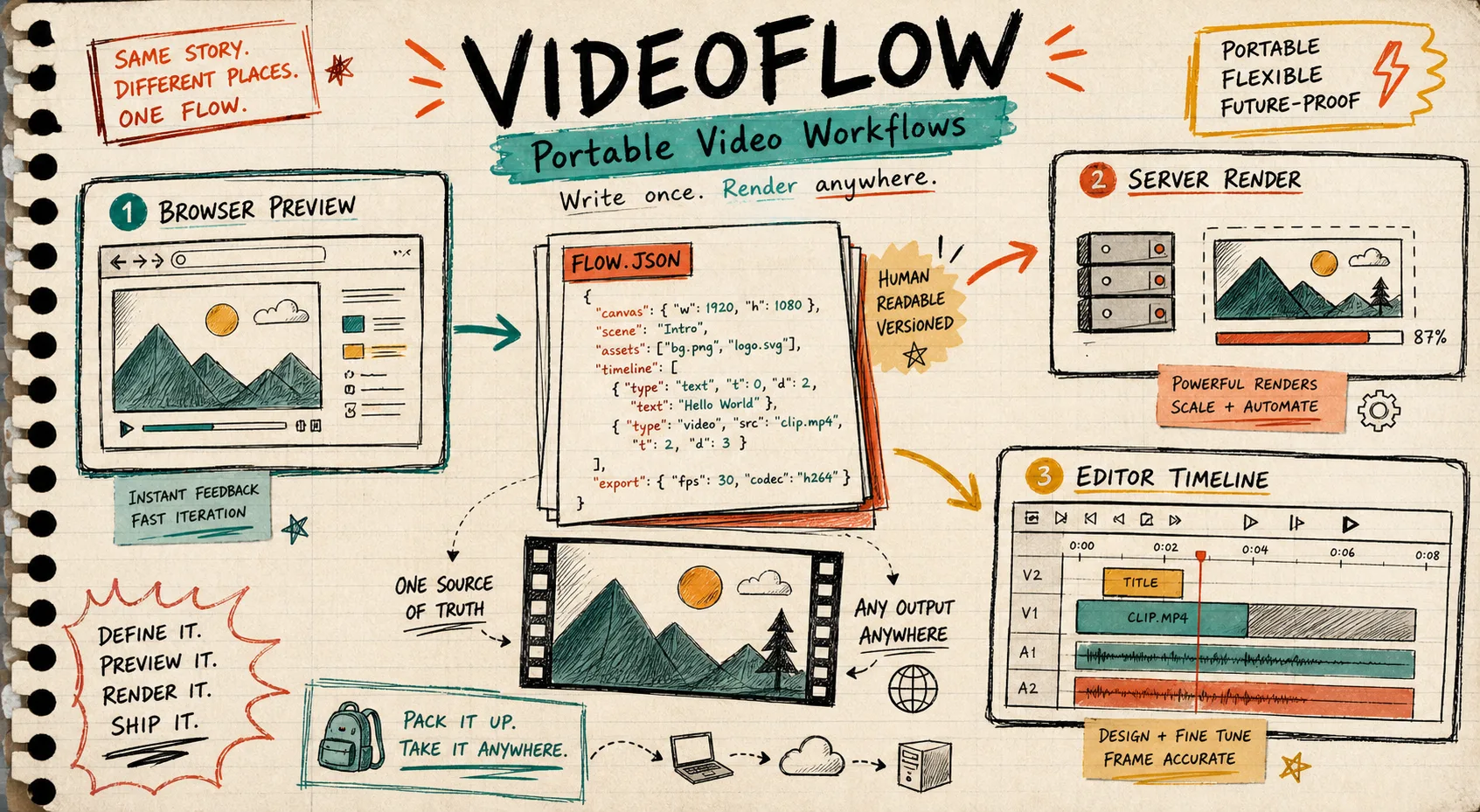
I kept running into the same annoying failure mode: a video template would look fine in one place, then drift somewhere else. The browser export would be close, the server render would be slightly different, and the editor preview would make me distrust the whole thing.
That is the part VideoFlow helped me clean up. The trick is not treating the timeline as the source of truth. Treat the portable VideoJSON as the source of truth, then let the browser, server, and editor consume it.
If you want the broader argument for that approach, I wrote about it in Why I Keep Video Projects in JSON Before I Render Them, and I still stand by that workflow.
Start With One Contract
The practical win here is boring, which is usually a good sign. Keep the project definition in one structured artifact:
- canvas size
- frame rate
- assets
- timeline order
- keyframes
- transitions
- export settings
VideoFlow is built for that. The core builder gives you a fluent TypeScript API, supports wait, parallel, grouping, keyframes, and the layer types you actually need for production work: text, image, video, audio, captions, and shape. The important part is that the result compiles into portable VideoJSON.

I like that because it gives me one place to review the whole video before I think about rendering details. The JSON can live in Git, it can be diffed, and it can be generated by a person or by an agent.
If you are starting from a prompt instead of a hand-built template, pair this with How I Turn a Prompt Into Structured VideoJSON With VideoFlow. That is the same idea, just one step earlier in the pipeline.
Let Each Renderer Do One Job
This is where I stopped overcomplicating the workflow. VideoFlow is useful because the same VideoJSON can render in different places without me rewriting the project.
- Use the browser renderer when a user clicks export inside the app and you want to avoid a server round trip.
- Use the server renderer for queue jobs, APIs, CI, scheduled renders, and bulk generation.
- Use the DOM renderer when you want a live, scrubbable preview in a dashboard or editor.
The renderer split matters because each one solves a different operational problem. The browser renderer can give you progress callbacks and cancellation. The server renderer is the right shape for headless jobs. The DOM renderer gives you live preview, scrubbing, frame-accurate seeking, audio sync, and Shadow DOM isolation.

That is also why I keep pointing people toward the renderer docs at VideoFlow Renderers. If you are comparing this stack with other options, that page makes the portability story easier to see.
I covered the three-renderer angle in How I Build a Three-Renderer Video Workflow With VideoFlow, and the merge-request-friendly angle in How to Build a Merge-Request-Friendly Video Workflow With VideoFlow. Those two posts fit this one well.
Keep The Editor Optional, Not Central
The React video editor is the part I would bolt on after the contract is stable, not before.
VideoFlow’s editor component gives you a multi-track timeline, keyframes, transitions, effects, themes, undo/redo, upload callbacks, and MP4 export. It is a real editing surface, not a toy preview. But I still want the underlying JSON to stay in control.
That is the part that keeps the product maintainable. If the editor changes the JSON, the JSON should still be the artifact everything else understands.

The editor page at React Video Editor is worth reading if you are building a SaaS tool and need users to tweak templates without giving up your rendering stack. I also like that the same system is open source under Apache-2.0, because that lowers the anxiety around building on top of it.
What I Keep Stable In The Contract
The fields that I keep boring on purpose are the ones that make the whole thing easier to maintain later:
import VideoFlow from "@videoflow/core";

const $ = new VideoFlow({
  name: "Campaign Cut",
  width: 1920,
  height: 1080,
  fps: 30,
});

$.addText(
  { text: "Launch Week", fontSize: 7, fontWeight: 800 },
  { transitionIn: { transition: "overshootPop", duration: "500ms" } }
);

const json = await $.compile();
const blob = await $.renderVideo();
That tiny example is enough to show the shape of the workflow. I care less about the exact scene and more about keeping the contract predictable:
- define the project once
- render it in more than one place
- keep the same asset references and timing model
- use resolution-independent sizing when possible
- avoid a hidden fork between preview and export
One detail I keep coming back to is the sizing model. VideoFlow maps 1em to 1% of the project width, which makes templates behave more predictably when you move between 720p, 1080p, and 4K.
If you want the Git discipline side of this, read How to Keep Video Templates Diffable in Git With VideoFlow and How to Build a Reviewable JSON-to-Video Pipeline With VideoFlow. Those are the posts I would hand to a teammate who wants the review loop to feel sane.
My Short Checklist
When I am deciding whether a video workflow is portable enough, I run this quick check:
- Can I explain the whole video as data?
- Can I render the same definition in the browser and on the server?
- Can I preview it live without guessing at the output?
- Can I hand the same source to a React editor if users need control?
- Can I diff the template in Git without reconstructing the whole scene from screenshots?
If the answer is yes to most of that, the workflow is usually worth keeping.
The example gallery at VideoFlow Examples is a good place to sanity-check what the system can do, and the core docs at VideoFlow Core are where I would start if I were wiring this into a real app.
The Part I Would Not Skip
I would not try to make the editor, the renderer, and the template format all mean different things. That is how video systems get weird fast.
Keep one portable VideoJSON source of truth. Let the browser export it when that is cheapest. Let the server render it when that is operationally cleaner. Let the editor inspect and mutate it without becoming the source of truth.
That is the line that keeps the whole stack understandable.
If you are evaluating VideoFlow from scratch, start at VideoFlow and then open the docs and playground. If you are already running a JSON-first workflow, the next useful step is usually to make the template reviewable in Git before you add more rendering paths.