

I don’t start a new automation by letting it touch the store. I start by asking it to tell me what I should look at. That sounds less exciting than an AI agent that changes products or chases late orders, but it is the version that has actually survived busy weeks for me.
For a small Shopify team, the first useful AI assistant is usually a read-only morning brief: one compact note that surfaces the odd orders, low-stock products, catalog gaps, and sales changes worth a human’s attention. Clawly is built for this kind of Shopify automation: you describe the assistant, connect the approved tools, and decide exactly what it can read, change, or notify.
The problem is not a lack of dashboards
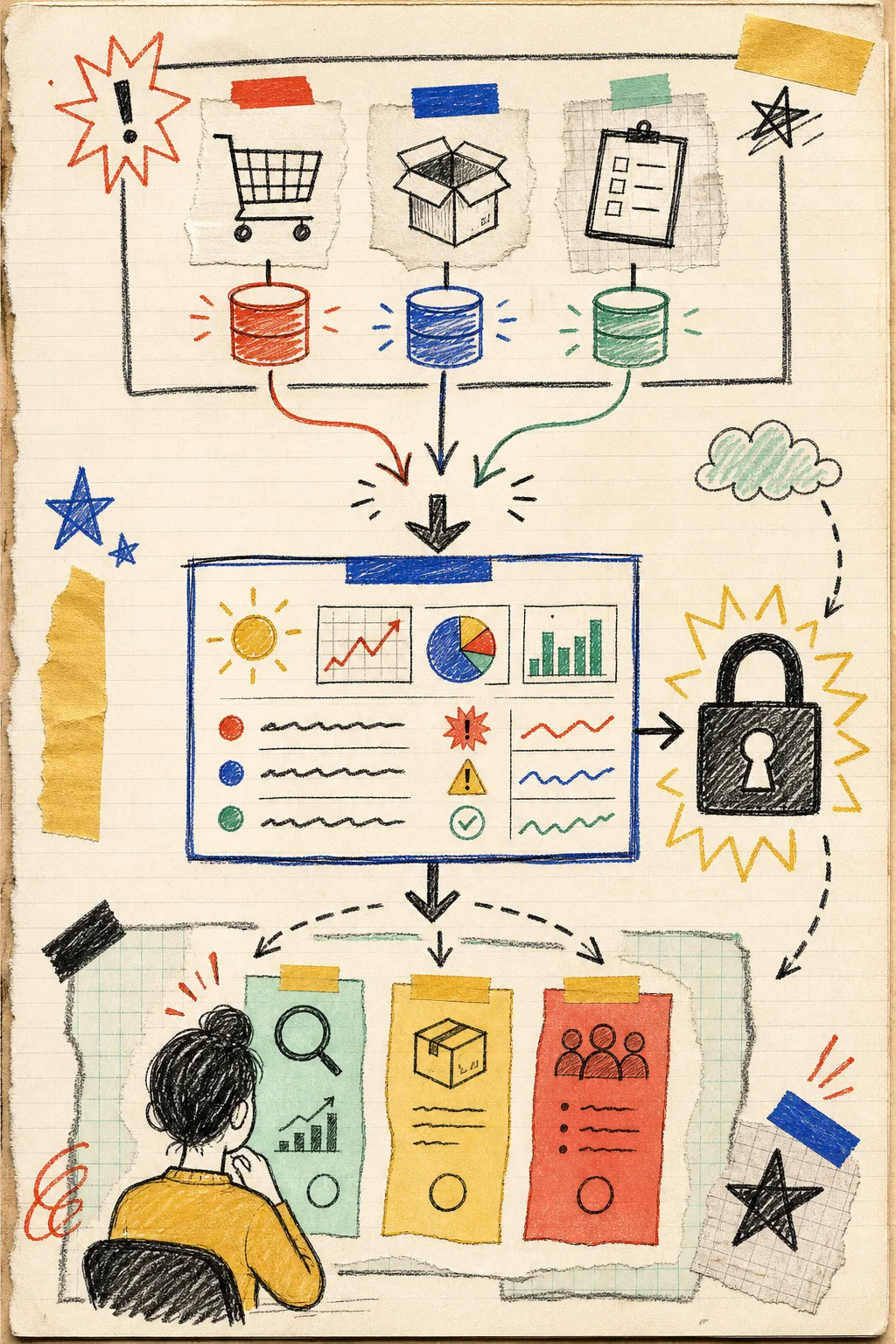
Most stores already have the ingredients: Shopify orders, product data, inventory counts, and a few reports. The friction is the daily scan. It happens between answering support, checking a campaign, and trying to remember whether that out-of-stock bestseller was already handled. A dashboard can show everything; it rarely tells me what deserves the next ten minutes.
A brief fixes that by making the assistant an observer first. Mine would contain four small sections:
- Order exceptions — unusual order patterns, payment or fulfillment issues, and anything that needs a closer look.
- Inventory watch — products below the thresholds I set, especially items with recent sales.
- Catalog cleanup — missing descriptions, inconsistent tags, or products that are not ready for the collection they belong in.
- Yesterday’s signal — top sellers, a noticeable sales shift, or a simple question to investigate.
The important constraint is that the agent reports findings; it does not edit a product, contact a customer, or change inventory. That same principle made my earlier read-only exception report much more useful than a vague monitor-the-store request.
Sketch the brief before connecting anything
I write the output format first, on paper if possible. That keeps the setup from turning into an integration scavenger hunt. A starter instruction could look like this:
Every weekday at 8:30 AM, review Shopify orders, inventory, and products.
Return a short read-only brief with: order exceptions, low-stock products,
catalog issues, and one sales observation.
Do not edit Shopify data, send customer messages, create discounts, or
place orders. Flag uncertainty instead of guessing.
That is enough direction to make the brief consistent without pretending it is a fully autonomous operator. Clawly’s Shopify-focused AI agents can connect across store workflows, but I prefer to enable only the integrations that the first question needs. Shopify is the starting point; a notification destination can come later.
For inventory, I want an explicit escalation rather than a silent fix. My field note on a human-approved Shopify inventory escalation is the pattern: the agent identifies the condition, a person decides what it means, and only then does a separate approved workflow act.
Put the guardrails where you can see them
The word agent can make people jump straight to permissions that are far too broad. I treat access like a shop key ring: give it the smallest key that lets it do today’s job. For a morning brief, my guardrail list is boring on purpose:
- Allow reading the specific Shopify resources needed for the brief.
- Disable product edits, discounts, customer messages, and external posting.
- Set thresholds in the instruction: for example, flag low stock instead of deciding a reorder.
- Send the report to a place a human already checks.
- Review the first few reports against Shopify before trusting its prioritization.
Clawly emphasizes granular permissions and scoped tool access, which makes this a sensible first project instead of a leap of faith. If the brief points at a recurring problem, you can then choose a smaller follow-up automation. For example, I would rather have an assistant draft a support reply for review than send it outright; the shift-handoff approach keeps that distinction visible.
Test with real but low-stakes questions
Before scheduling the brief, run it manually with one narrow prompt. Check whether the products it names actually need attention, whether the inventory threshold makes sense, and whether the report is short enough to read. If it is producing a novel every morning, ask for fewer categories and a fixed number of findings per category.
A useful test is to compare the brief with one morning’s normal manual scan. If the assistant finds the same two or three important issues—and makes the next step clearer—it is doing its job. If it creates noise, refine the instruction before adding more tools. For order-focused teams, the same low-risk testing discipline is useful in this guide to turning order exceptions into a read-only AI morning brief.
Earn more trust one rung at a time
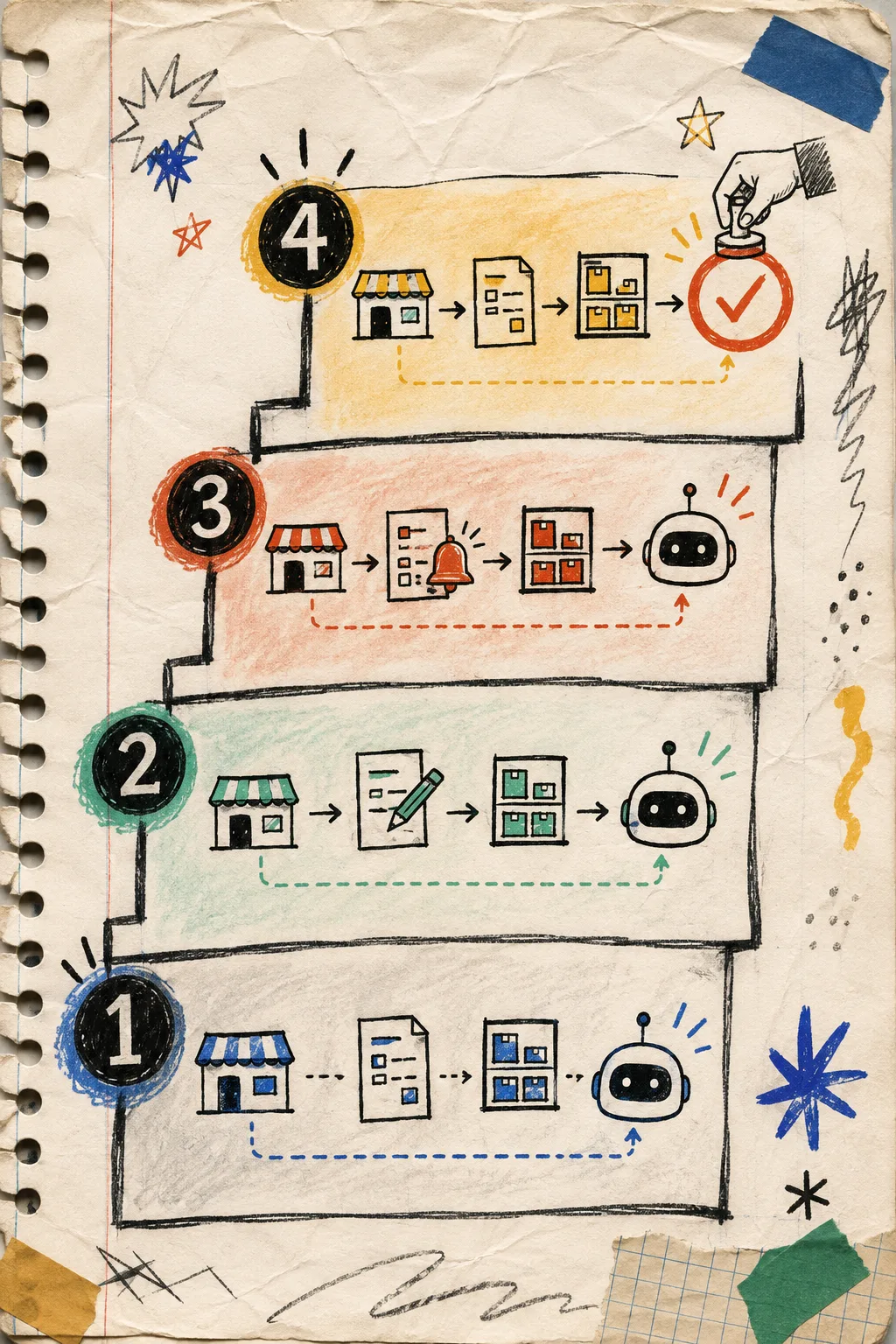
Read-only observation is not a dead end. It is the baseline that tells you where an agent can genuinely help. I move through four stages:
- Observe — summarize signals without changing anything.
- Draft — prepare product copy, a support response, or a tag suggestion for review.
- Notify — send a clearly scoped alert when a threshold is crossed.
- Act with approval — make one narrowly defined change only when the review path is explicit.

Each rung gives you evidence about the assistant’s judgment and the data it needs. It also keeps an automation failure from becoming a storefront failure. The next automation might be a low-inventory alert, a weekly sales summary, or draft SEO titles for new products—not every workflow at once.
My next step
If you are trying Clawly on the Shopify App Store, make the first agent a morning observer. Choose one owner, three or four signals, a read-only scope, and a report destination. Run it for a week, keep a few notes about what it caught or missed, then decide which single action is worth automating next. That is a much sturdier way to build a Shopify AI assistant than handing an autopilot the keys on day one.