

How I Write Shopify Blog Briefs That Keep Product Detail Intact
I keep seeing the same failure mode with automated Shopify blogging: the draft is clean, but it could belong to any store.
That usually means the brief was too thin. If the system does not know the product, the reader problem, the internal link path, and the review rule, it will default to generic ecommerce prose. Supra Blog Automation is useful because it starts from product-aware context, generates SEO-focused posts and visuals, and can publish immediately or save a draft for review. That gives me a workflow instead of a pile of half-finished ideas.
If you want the broader operating model behind this, How to Build a Product-Aware Shopify Blog Workflow is the cleanest companion piece. For the scheduling side, How to Build a Shopify Content Calendar That Writes Itself is the version I use when I need a repeatable calendar, not a one-off article.
Start with one product and one reader problem
The brief gets better as soon as it stops being abstract.
I do not begin with “write a blog post about the store.” I begin with:
- one product or collection;
- one shopper problem;
- one promise the post should help prove;
- one page the reader should visit next.
That small constraint is what keeps the article from wandering. It also makes the CTA obvious. If the post is about a product, the CTA should help the reader view that product. If it is about a collection, the CTA should help them browse the collection. If it is informational, the CTA should move them to the next useful page instead of pretending every post needs to close a sale.
That is also why I like How to Turn Shopify Products Into SEO Blog Posts on a Schedule as a companion reference. The article works because the scheduling problem and the product problem are solved together, not separately.
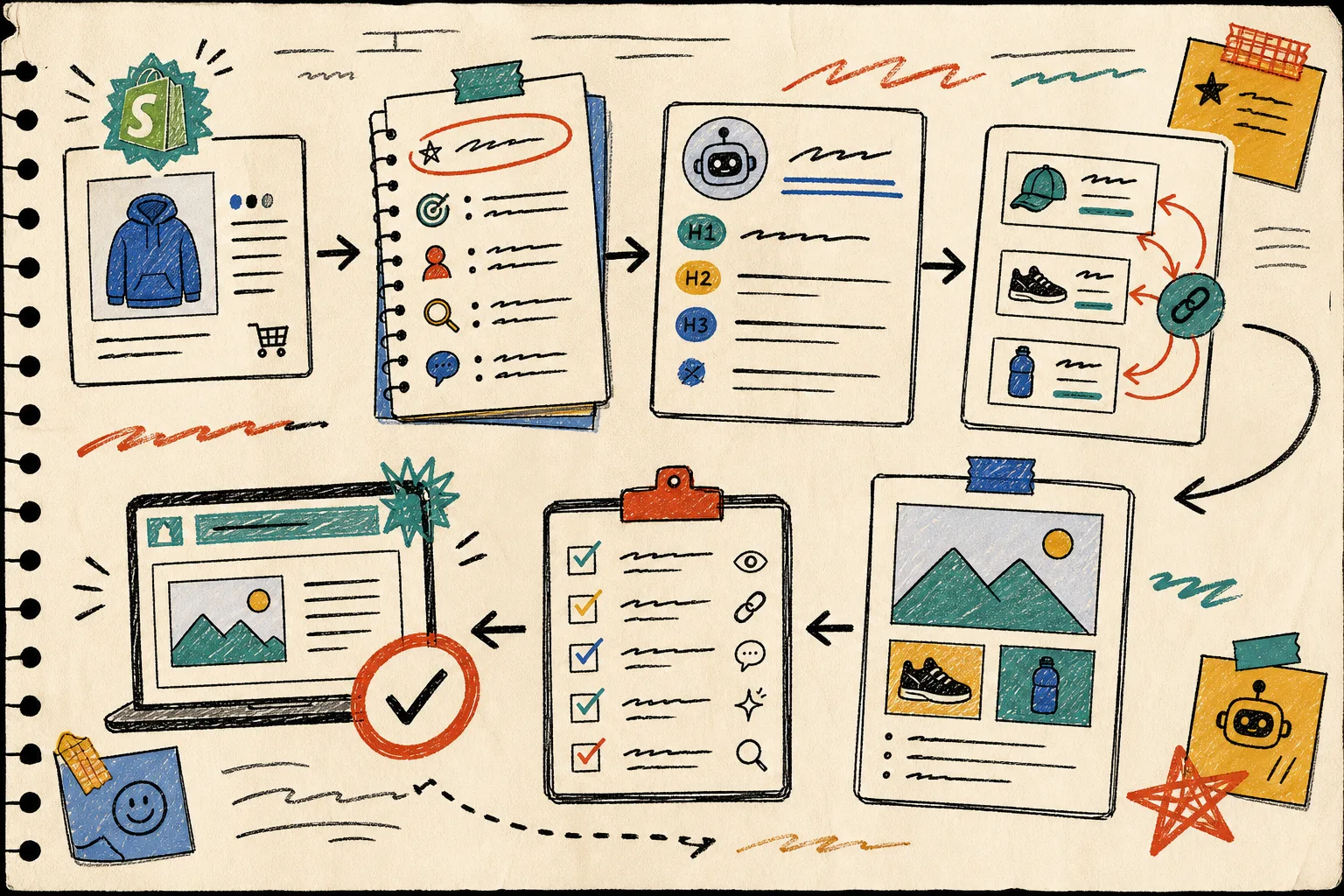
The brief I actually use
When I set up the article, I keep the brief to five things:
- product or collection context;
- reader problem or decision;
- search intent or topic angle;
- internal links the post should use naturally;
- image plan and review rule.
That is enough structure to keep the draft useful without boxing it in. The product file and the blog file do different jobs. The product tells the model what to say. The blog style tells it how to say it and how the page should feel. If one of those is missing, the output tends to slide toward generic content.
How to Automate Shopify Blogging Without Losing Product Detail makes the same point from a different angle: automation is not the problem, thin context is.
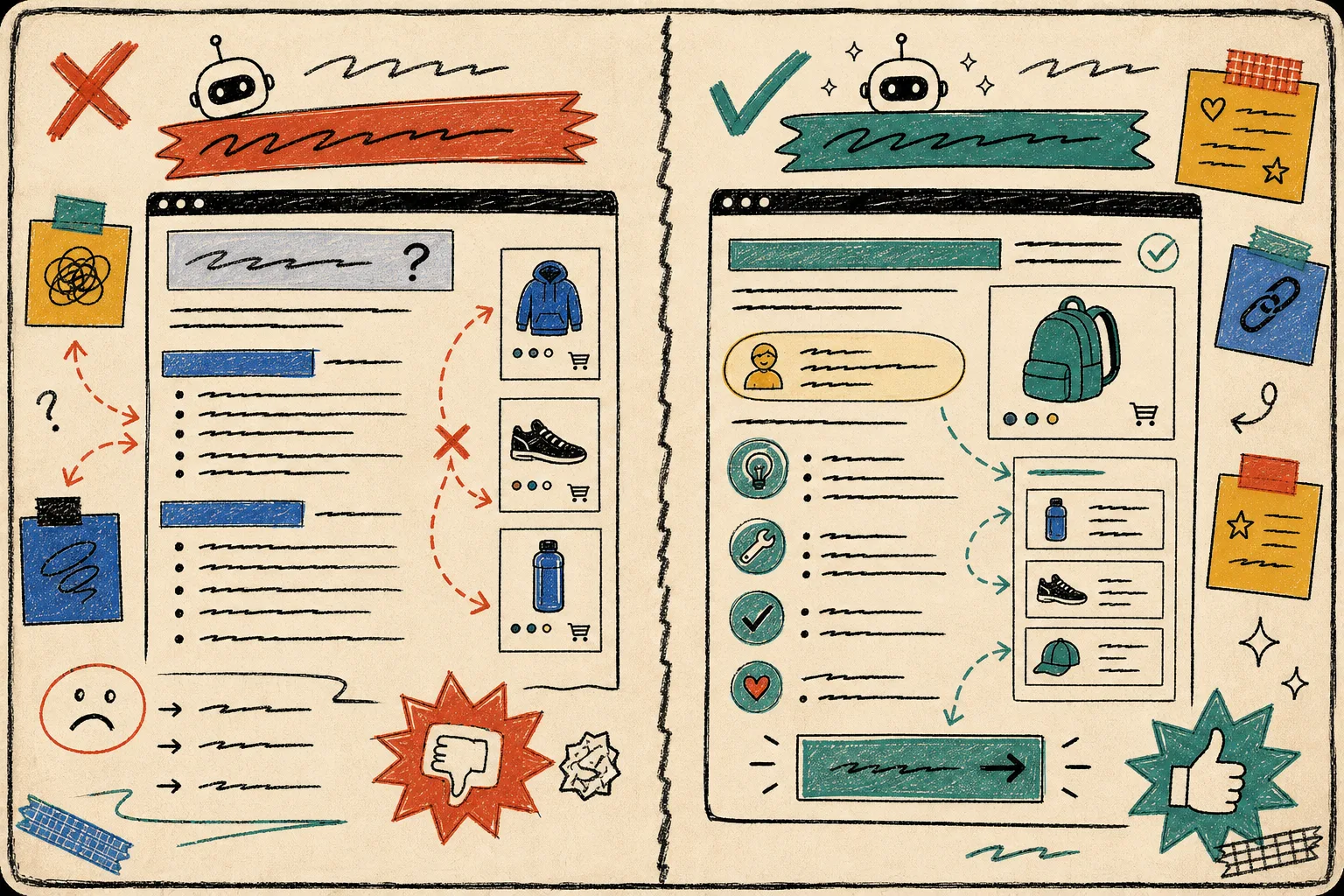
Use visuals to explain the job, not decorate the page
I do not want blog images to be pretty filler. I want them to do work.
Supra Blog Automation can use AI-generated, stock, or product-based visuals, which is useful because different articles need different kinds of proof. A workflow post wants a diagram. A product explainer wants a product-aware visual. A comparison post wants a split-screen that makes the tradeoff obvious at a glance.
This is the visual logic I use:
- use one hero image to frame the topic;
- use one process image to explain the workflow;
- use one comparison image when the reader needs to choose;
- use one review or checklist image when trust matters.
The point is not to have more images. The point is to make the page easier to scan and easier to believe.

Put the human review where trust actually lives
I would not auto-publish every Shopify post, even if the system can technically do it.
The review pass is where I check:
- product facts;
- link targets;
- brand voice;
- claims that could confuse a shopper;
- whether the visuals match the article;
- whether the CTA fits the reader’s stage.
That step matters most on posts touching product claims, policy language, or any subject where a mistake could cost trust. Automation should handle the repetitive parts. The human pass should catch the stuff that quietly breaks credibility.
This is where the publish control in Supra Blog Automation helps. The app can publish immediately or save as a draft, so I can keep the cadence moving without pretending every article is safe to ship blind.
Keep the calendar boring on purpose
The strongest automation I have seen is also the least dramatic.
A realistic pattern looks like this:
- one product spotlight;
- one educational post;
- one comparison or collection post.
That is enough to keep the blog active and varied without making the calendar chaotic. If you want the planning version, How to Build a Shopify Content Calendar That Writes Itself is the cleaner system-level guide. If you want the article-level version, How to Build a Product-Aware Shopify Blog Workflow shows how to keep each post anchored to a real product and a real reader job.
The reason I like recurring automations is simple: they turn blogging into a schedule instead of a mood. Once the schedule exists, it is easier to review, easier to measure, and much harder to ignore.
The rule I use for publishing
My rule is straightforward.
Auto-publish the posts that are low risk, tightly scoped, and repetitive. Save as draft when the topic is sensitive, the claims need review, or the brand voice matters more than speed.
That is the practical middle ground. You get the speed of automation without giving up the part of the process that protects the store.
If you want to try that in Shopify, start with one product, one collection, and one drafted article. Supra Blog Automation is set up for that kind of workflow, and the Shopify App Store listing or the landing page are the fastest places to test it. There is a free plan if you want to prove the process before you commit.
Bottom line
A Shopify blog only stays useful if the posts keep enough product detail to matter. The fix is not more volume. It is better briefs, natural internal links, and a review step that protects the parts of the draft that shoppers will actually notice.
The next move is simple: pick one product, write a five-line brief, and generate one draft before you try to automate the whole calendar.