
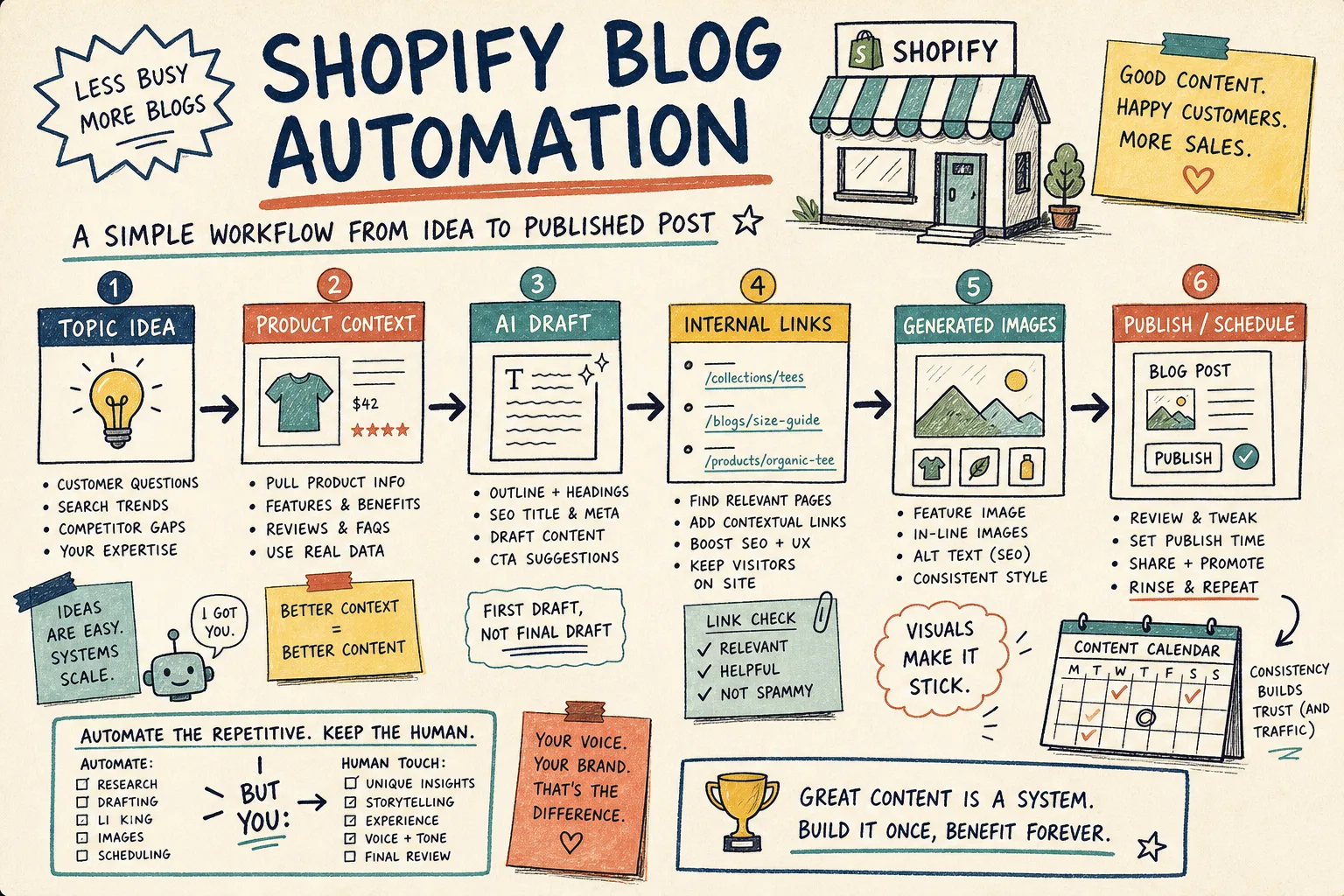
How to Build a Product-Aware Shopify Blog Workflow
I keep seeing the same failure mode with automated Shopify blogs: the system publishes something technically complete and practically useless. It has headings, SEO text, maybe even a decent cover image. It also sounds like it could have been written for any store on earth.
The fix is not less automation. It is better inputs. Once you start with product context, one reader problem, a few relevant links, and a review step for claims, automated blogging becomes an operating system instead of a content slot machine.
If you want the scheduling layer behind this, I broke that out in How to Build a Shopify Content Calendar That Writes Itself. If you want the product-first angle, How to Turn Shopify Products Into SEO Blog Posts on a Schedule is the companion piece that goes deeper on recurring publishing.
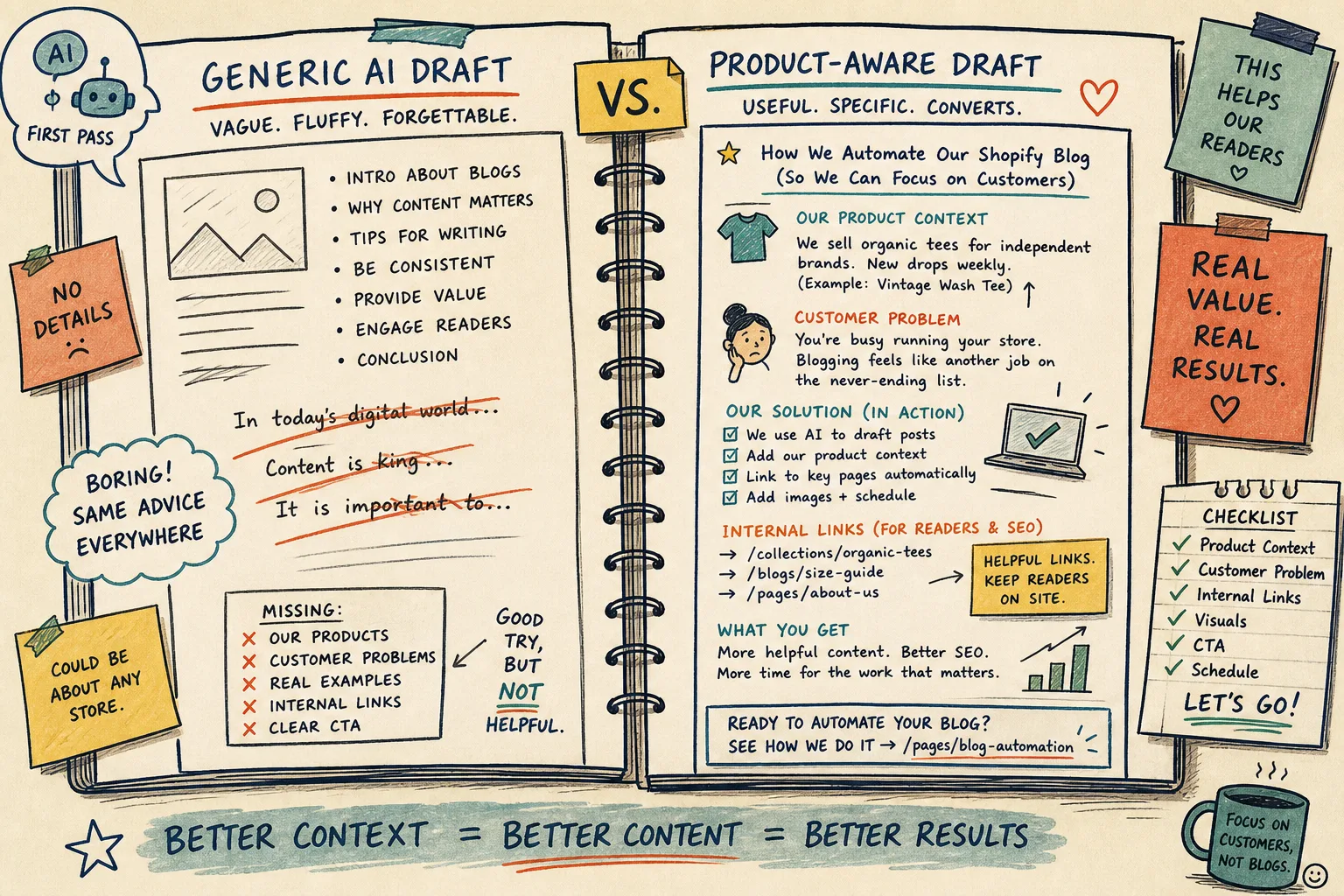
What makes a Shopify blog post feel store-specific
A store-specific post usually does four things well:
- it starts from a product, collection, or category that actually matters;
- it answers one customer question instead of trying to cover everything;
- it points to the next useful page on the site;
- it uses visuals that teach, compare, or reassure.
That is why I would use Supra Blog Automation for this kind of workflow. It can generate posts on demand or on a schedule, it supports built-in SEO and internal links, and it can publish immediately or save as a draft when you want a human pass first. That last part matters more than people think. Automation is useful when it removes repetitive work, not when it removes judgment.
Start with product context, not a blank topic
The easiest way to get generic output is to ask for blog ideas with no context. The easier fix is to feed the system the product or collection first, then ask what the customer needs to know.
A good starting prompt is more like:
- feature the product or collection name;
- include the main benefit in plain language;
- add the customer objection you want to overcome;
- tell it what action you want the reader to take.
If you want the broader product-to-post pattern, How to Turn Shopify Products Into SEO Blog Posts on a Schedule is a good model for turning product inventory into a real publishing loop. The same logic also shows up in How to Build a Shopify Blog Automation Workflow That Still Sounds Human, which is basically the do-not-sound-like-a-robot version of this same problem.
Build one problem, one post, one CTA
I get better results when the article solves one thing well instead of trying to be a general ecommerce essay.
For example:
- a product launch post can explain why the product exists;
- a collection post can help shoppers choose between options;
- an FAQ post can answer the top objections before the customer leaves;
- a comparison post can help shoppers decide faster.
That makes the CTA easier too. You are not asking the reader to do five things. You are asking them to click through to the product, browse the collection, or keep reading a related guide.
This is also where internal links matter. A useful automation setup should place links naturally, not as a random list at the bottom. If a post mentions sizing, point to the size guide. If it mentions fabric care, point to the care page. If it mentions a collection, point there. That is what makes the post feel like part of the store instead of a detached content island.
Let visuals do real work
I do not treat blog images as decoration. On a store blog, they should either clarify the workflow, show the product in context, or make the post easier to scan.
Supra Blog Automation supports AI-generated, stock, and product-based visuals, which is useful because not every topic needs the same treatment. A how-to guide may benefit from a workflow illustration. A product round-up may need a simple visual grid. A seasonal post might work better with a branded hero image and one or two supporting illustrations.
The main rule is simple: the image should help the reader understand the post, not just fill the page.
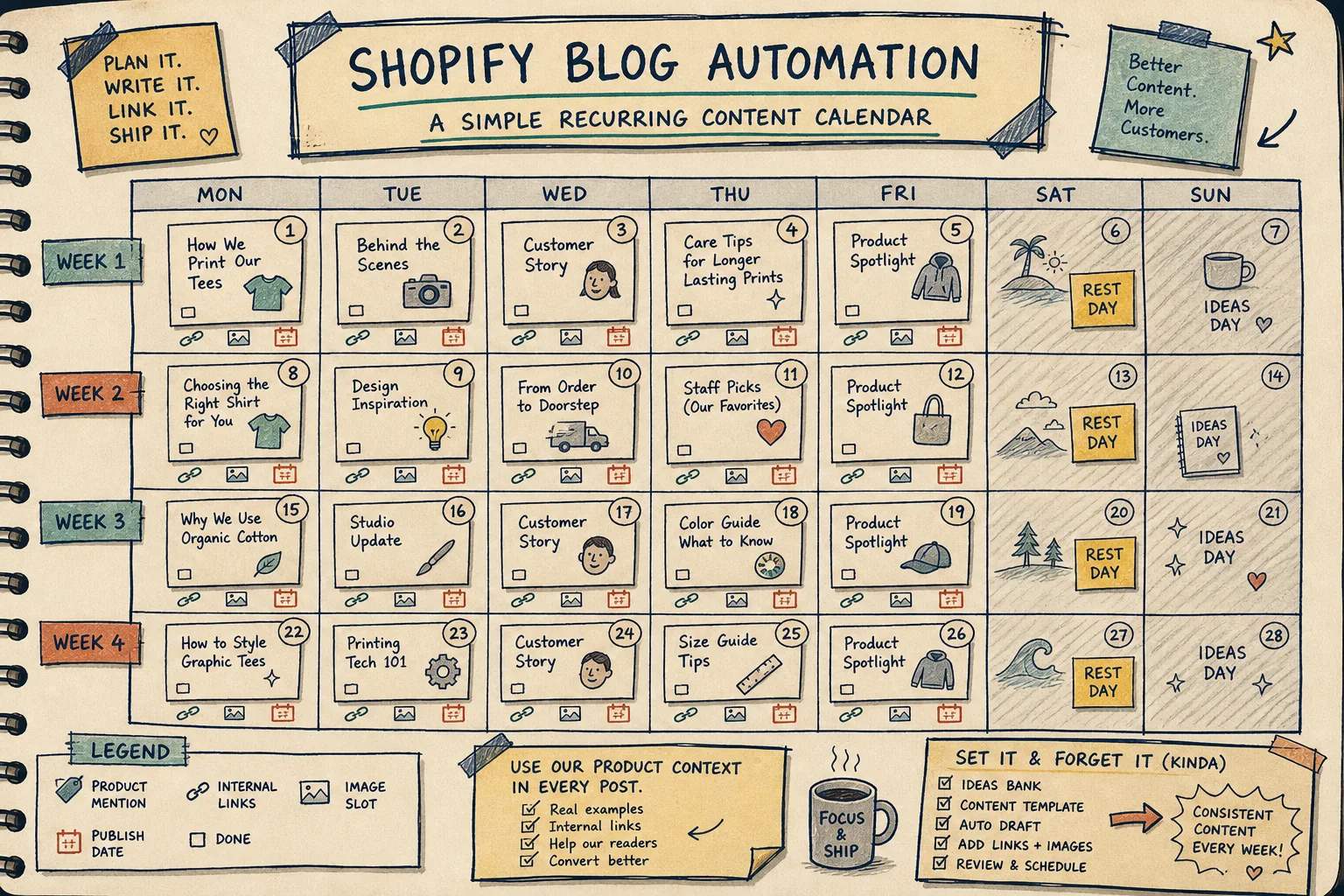
Use a recurring calendar that you can actually sustain
A lot of content systems fail because they assume the store has endless bandwidth. It usually does not. A realistic calendar is better than an ambitious one you abandon after two weeks.
The shape I like is:
- one product spotlight;
- one helpful educational post;
- one comparison or FAQ post;
- one seasonal or collection-driven post.
That mix keeps the blog useful without making every post feel like a sales pitch. It also gives automation a clear job. You are not asking the system to invent random content. You are giving it a repeatable structure.
If you want the calendar side in more detail, How to Build a Shopify Content Calendar That Writes Itself walks through the recurring pattern I would use for a small store. And if your blog tends to drift into vague copy, How to Keep a Shopify Blog Publishing Without Generic AI Drafts is a good reminder of the guardrails that keep the output readable.
Save draft review for the parts that matter
I would not publish everything blindly, even if the system can do it. The best setup is usually automation plus review, not automation instead of review.
I still check these items before publishing:
- product facts;
- pricing claims;
- shipping or policy statements;
- brand voice;
- link targets;
- alt text and image fit.
That is especially important when the article touches anything that could confuse buyers. A tool can draft fast. A human is still better at catching the small mismatches that erode trust.
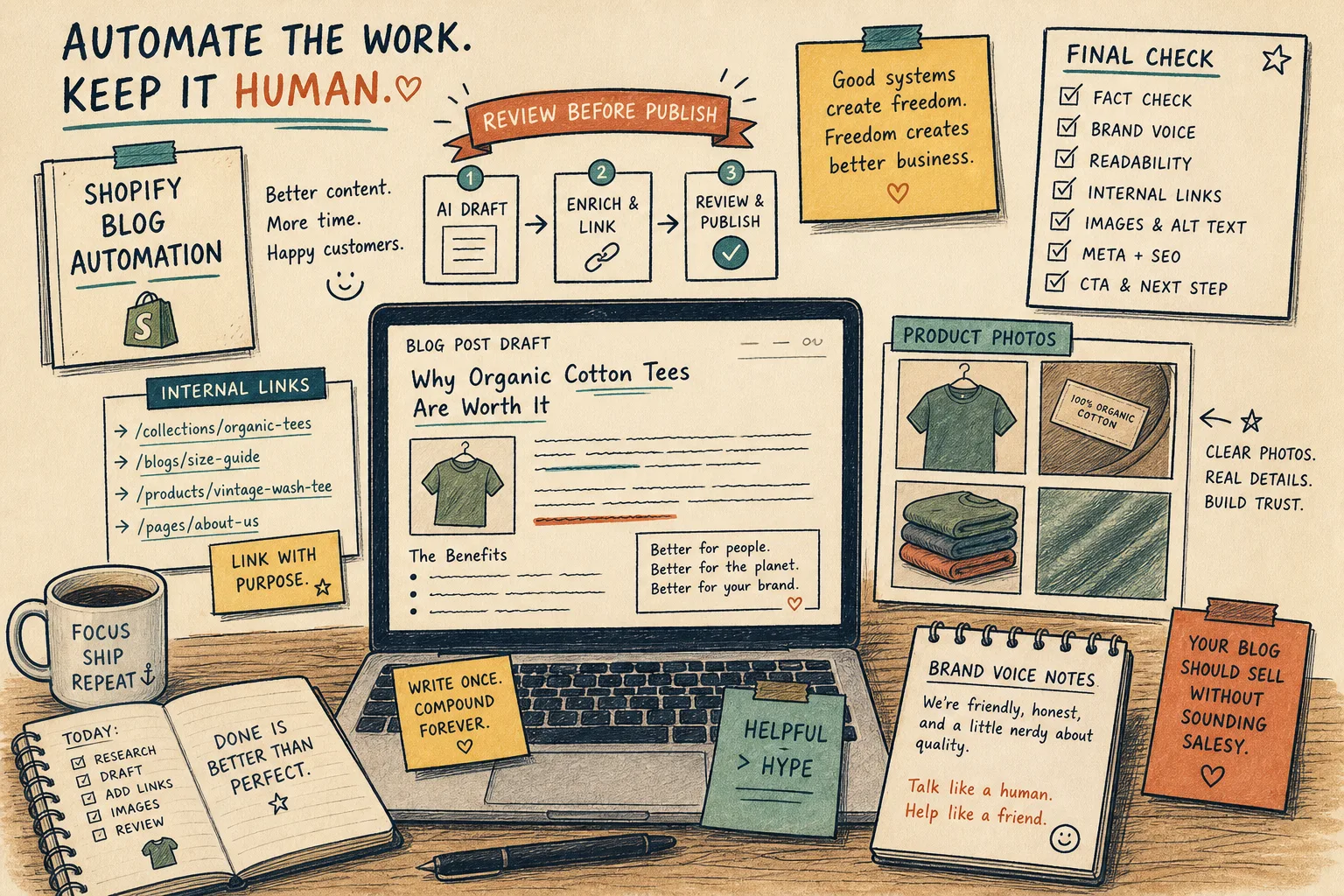
A good rule is to publish automatically only when the post is low risk and highly repeatable. For anything launch-related, policy-adjacent, or brand-sensitive, save it as a draft first. That is where Supra Blog Automation’s publish-now-or-save-as-draft workflow is useful.
A simple weekly rhythm
If I were setting this up for a small Shopify store, I would keep the schedule boring on purpose:
- Monday: product spotlight;
- Wednesday: educational or FAQ post;
- Friday: comparison, seasonal, or collection post.
That rhythm is easy to automate, easy to maintain, and easy to measure. It also leaves room for the posts that deserve extra attention.
The calendar image above is the kind of structure I would want the system to fill in. Once the categories are clear, the app can keep the blog moving without requiring a fresh brainstorm every week.
Bottom line
If your Shopify blog only works when someone has spare time to write from scratch, it will eventually stall. A product-aware workflow fixes that. Start from the product, write for one reader problem, link to the next useful page, and keep a human review step for the posts that matter.
If you want to try that inside Shopify, start with one collection, one post, and one draft review. Then use the Shopify App Store listing or the landing page to set it up. There is a free plan if you want to test the workflow before committing.