

Which Shopify Products Should Get 3D Models First? A Practical Scorecard
My first rule for Shopify 3D is deliberately unglamorous: do not scan the whole catalog. Start with one physical SKU whose shape, construction, or scale shoppers genuinely struggle to infer from photos. A good first model is visually legible, easy to capture, and attached to a product page where a shopper can actually use the extra angle.
That is a more useful starting point than choosing the bestseller or the prettiest sample. Shopify supports 3D product media when the theme supports it, and accepts GLB or USDZ files up to 500 MB; it also optimizes models larger than 15 MB. The technical door is fairly open. The harder decision is deciding where a spin-able model earns its maintenance cost.
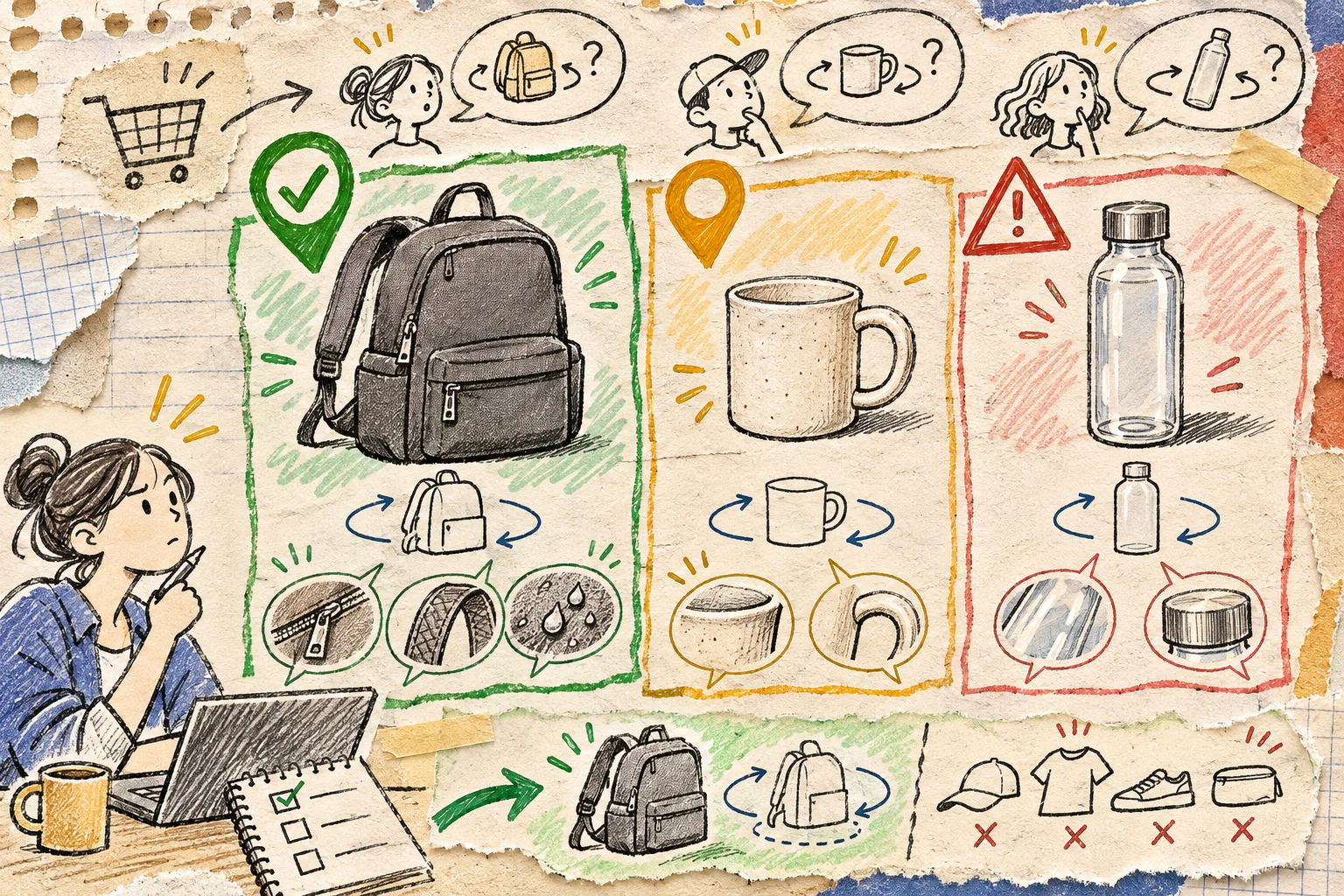
Use this four-signal scorecard
I put three candidate products on one sheet and score each signal 0, 1, or 2. A product at 6 or more is a pilot candidate; 4 or 5 stays in the photo queue; 3 or below waits. This is a prioritization tool, not a promise of conversion lift.
| Signal | 0 points | 1 point | 2 points |
|---|---|---|---|
| Shape question | Flat or instantly understood | One useful angle is missing | Form, depth, compartments, or moving parts change the decision |
| Material question | Photos communicate it clearly | Texture matters a little | Surface, seams, finish, or construction need close inspection |
| Capture readiness | Clear, reflective, tiny, or unstable | Needs some staging | Matte, stable, well-lit object with a clean edge |
| Page leverage | Low-traffic or weak fit | Useful but secondary | Core product page, launch SKU, bundle anchor, or high-consideration choice |
A structured backpack usually scores well: shoppers care about pocket depth, strap shape, zipper placement, and silhouette. A plain tee usually does not; good flat and worn photography will do more work. A clear bottle can be important to inspect, but it is a poor first photogrammetry experiment because transparent and reflective surfaces are harder to reconstruct cleanly.
This is the same small-pilot logic behind my earlier Shopify 3D media pilot, but the scorecard makes the choice repeatable when the catalog gets noisy.
Match the model to a real shopper question
Before I open a camera, I write one sentence: “A shopper should be able to answer ___ after rotating this model.”
For a backpack: Will the side pockets, back panel, and base work for my daily carry? For a handmade mug: How thick is the handle and where does the glaze break? For a storage bin: How bulky are the corners relative to the capacity?
If the blank fills with “what color is it?” or “what size do I need?”, fix the product photos or the size guide first. A 3D viewer is not a replacement for color-accurate imagery or fit information; it is an extra inspection surface. The three-product size-chart sample is a useful companion check for anything wearable.
Run one controlled capture, not a catalog project
For the first SKU, use a product you can leave in place for 20 minutes. Clean it, remove loose tags, use even light, and give it visual separation from the background. Then capture a complete orbit at a few heights instead of randomly collecting closeups.
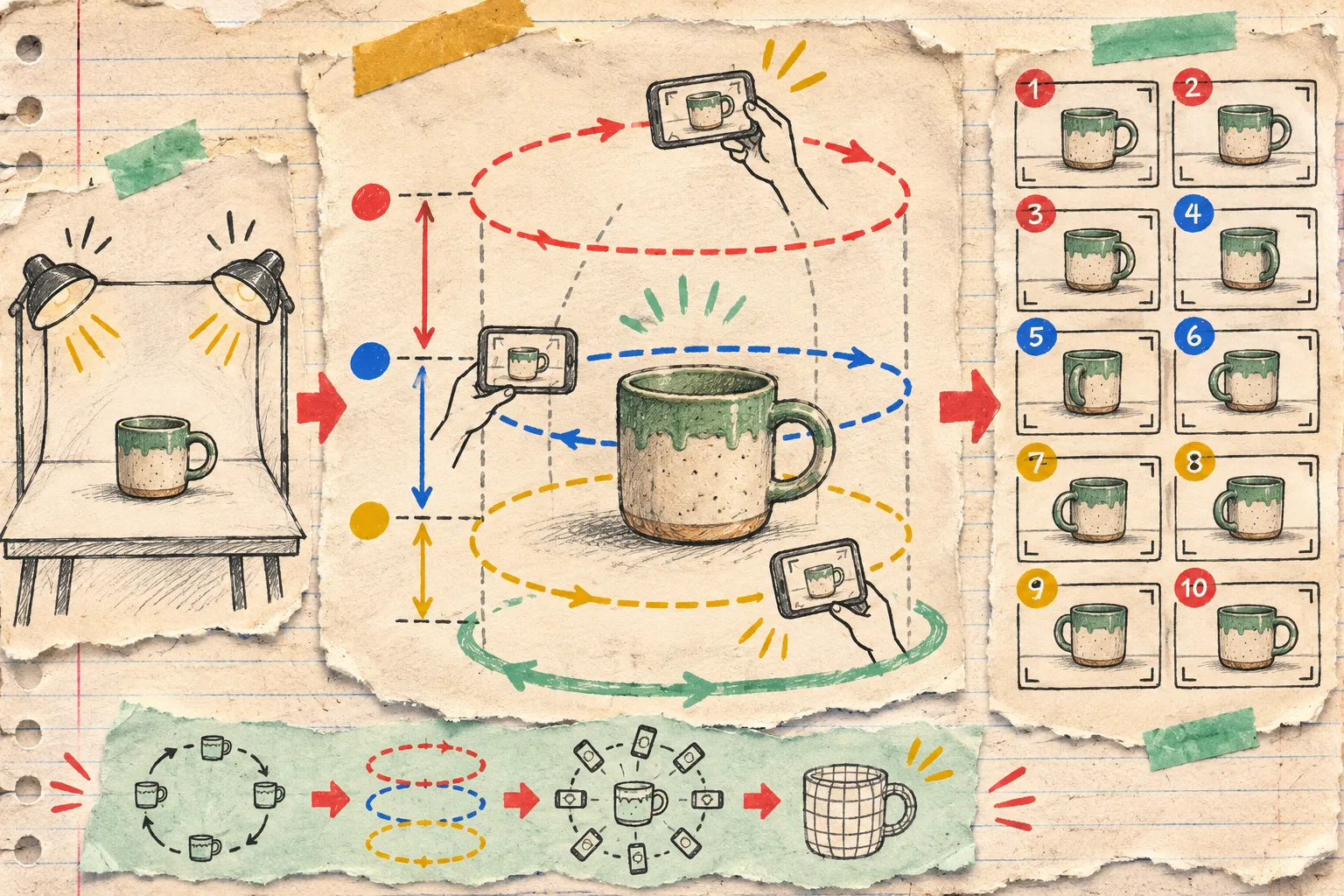
Supra 3D Capture’s stated workflow is a guided phone capture, cloud processing into a web-ready GLB, then publishing to Shopify product media or an Online Store 2.0 app block. The product page says it uses 10+ guided photos; its App Store listing also describes an in-admin editor for trimming a base, softening surfaces, and cleaning stray geometry. That makes it a practical pilot route when you want to test the reader question before commissioning bespoke 3D work.
My capture card has only four checks:
- Orbit: every side appears at least once, including the top and the base edge.
- Lighting: no hard shadow crosses the product halfway through the sequence.
- Identity: use the sellable colorway and the current construction, not a retired sample.
- Escape hatch: stop early when the object is clear, mirrored, hairy, very thin, or moving; those are separate capture problems, not a reason to force a bad model live.
If you want the fuller phone setup, this capture-card field note is the checklist I keep beside the turntable.
Publish only after the model survives four product-page checks
A rotating object can look charming in an editor and still mislead on a phone. I test the completed model in the actual product template before treating it as product media. Shopify notes that the theme must support the media you add; Shopify-built Online Store 2.0 themes support 3D models, while third-party themes may need their own compatibility check.

My release gate is:
- Silhouette: the rotation never creates a missing handle, collapsed corner, or floating piece.
- Material truth: the model does not make a matte finish look glossy or hide a meaningful texture.
- Mobile behavior: it loads, rotates, and sits beside the photo gallery without covering a buying control.
- Fallback: photos and copy still explain the product if a shopper never opens the model.
That last point matters. A 3D model should improve an honest page, not compensate for a vague one. I use the same principle when I make truthful photo variants from one master: preserve the thing the customer is actually buying.
Make the next choice from evidence
After the pilot, watch the product page rather than declaring victory from the novelty. Are shoppers using the model? Did support still receive the same “where is the zipper / how deep is it / will it fit” questions? Did the model reveal a missing product photo you should add anyway? Keep a short note on what changed.
If the first SKU clears the scorecard, capture card, and release gate, pick the next similar product—not every item at once. Install Supra 3D Capture, run one matte, stable, high-question SKU through the workflow, and publish only when the spin answers a question your existing gallery cannot.